



OVERVIEW
1.1 - ABOUT VARIANTSEQ
VariantSeq is a Client-Desktop Application of the GPRO suite that uses best practices for analysis of Single Nucleotide Polymorphisms (SNP) and indels from DNA and VariantSeq data using the State-of-the -Art protocols (Fig.1). Tools for analysis of CNVs and/or structural variants are not yet implemented in the protocol. The application is an interface-based solution coupled with an infrastructure of server side dependencies (pipelines, databases and tools) that we distribute in a docker container that can be installed on a remote server or on a PC with sufficient RAM. The application also includes a File Transfer Protocol system (FTP) to facilitate the upload and download of files from the user’s computer to or from the server; a progress tracker (job tracking system), and two different execution modes (a “step-by-step” mode, and a “pipeline-like”mode).
The Step-by-Step mode is a procedure similar to those implemented in Galaxy (Afgan et al 2018),and others GUI-based solutions for NGS data analysis. This mode enables the user to run the analyses as a workflow of steps where each step can be completed independently from all other steps and where the options and the parameters of each analysis are declared prior to run the analysis. The Step-by-Step menu organizes the different steps of the variant analysis workflow (i.e. quality analysis, preprocessing, postprocessing, mapping, variant calling, filtering, annotation) into an intuitive menu providing a tab per step and a scroll down per tab summarizing the command line interface (CLI) software available for each step. In that way, the Step-by-Step mode permits the user to manage different protocols for variant analysis depending on the topic to address (populational studies, cancer, mendelian or hereditary diseases etc).
VariantSeq also implements the VQS/Haplotyper protocol for the detection, characterization and quantification of viral quasispecies from NGS amplicon sequencing data.
In contrast, the pipeline mode is a pipeline configuration system allowing the user to execute all the steps of a given protocol automatically one after the other. To this end the user just need to select a specific pipeline from a list, declare the experiment design as well as the input and output data, then configure the option and parameters and finally run the pipeline where the distinct analyses will be executed sequentially one after another.
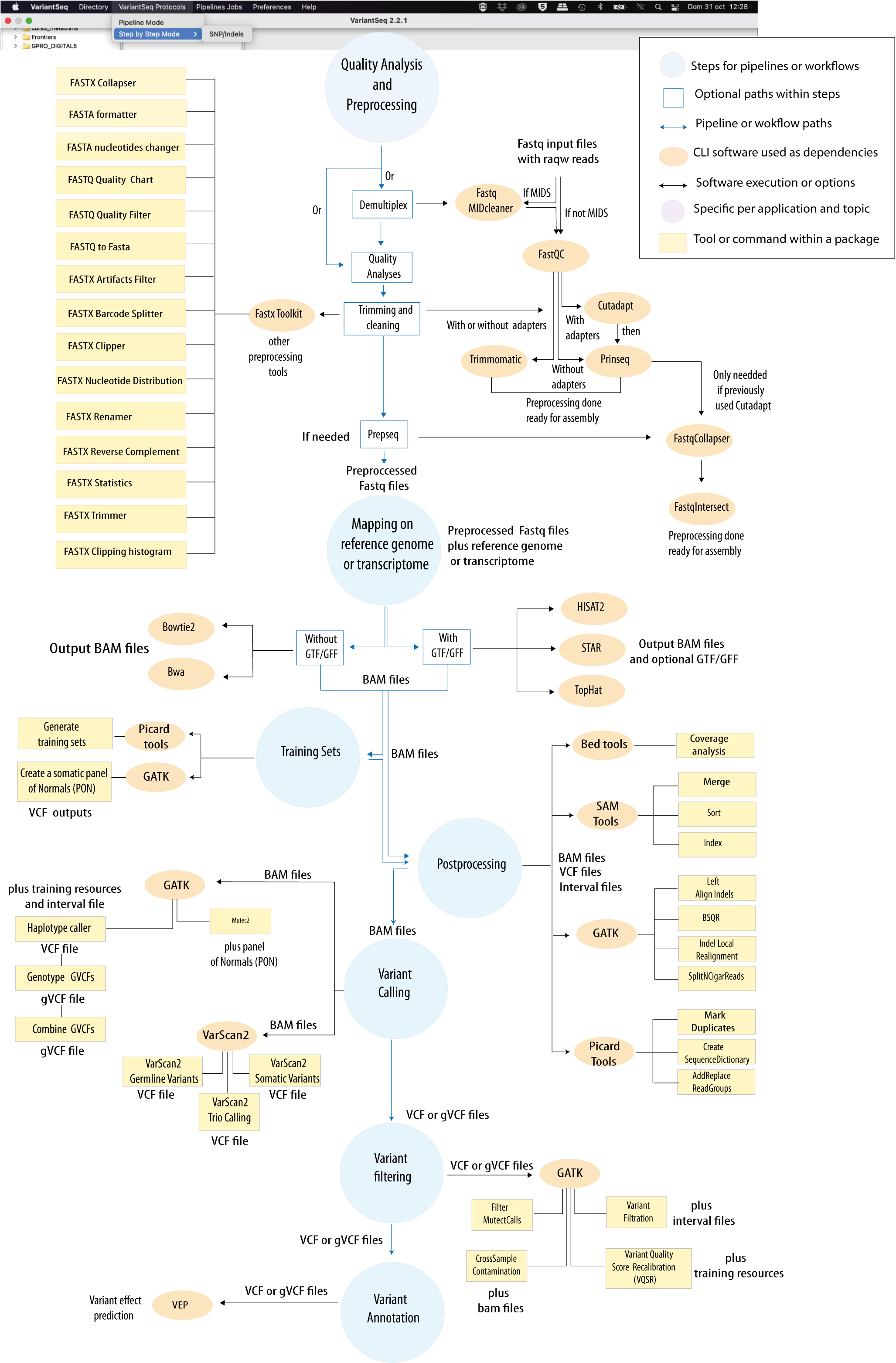
Figure 1: Bioinformatic protocol implemented in VariantSeq for analysis of Single Point Mutations and Indels according to the most common Variant-seq practices. The tool provides two execution modes (Step-By-Step and Pipeline-like) for execution of this protocol. An interactive scheme of this protocol is available at GENIE our virtual assitant.
CITING RNASEQ:
Hafez AI, Soriano B, Elsayed AA, Futami R, Ceprian R, Ramos-Ruiz R, Martinez G, Roig FJ, Torres-Font MA, Naya-Catala F, Calduch-Giner JA, Trilla-Fuertes L, Gamez-Pozo A, Arnau V, Sempere-Luna JM, Perez-Sanchez J, Gabaldon T, Llorens C. 2023. Client Applications and Server-Side Docker for Management of RNASeq and/or VariantSeq Workflows and Pipelines of the GPRO Suite. Genes; 14(2):267. https://doi.org/10.3390/genes14020267CITING GPRO SUITE:
Futami R, Muñoz-Pomer A, Viu JM, Dominguez-Escribá L, Covelli L, Bernet GP, Sempere JM, Moya A, Llorens C. 2011. GPRO: the professional tool for management, functional analysis and annotation of omic sequences and databases. Biotechvana Bioinformatics: 2011-SOFT3, http://bioinformatics.biotechvana.com/index.php/article/351.2 - VERSION AND DOWNLOADS
VariantSeq includes an installer for Windows 7 (64 bit), a self-extracting disk image for Mac OS X 10.6 or later (64 bit), and a compressed tarball archive for Linux 2.6 kernel series or later (64 bit). The latest version of these executables can be downloaded here:1.3 - INSTALLATION AND REQUIREMENTS
1.3.1. INSTALLING VARIANTSEQ IN YOUR PC
VariantSeq is a Java application that can be easily installed on PCs with at least 2GB of RAM and that have installed the Java Runtime Environment (Java JDK) version 17 or above.To check if you already have a JDK installed, open a command line interface and type:
java -version |
$ java -version
|
http://www.oracle.com/technetwork/java/javase/downloads/index.html and download the version that suits your operating system. Once installed, re-check the output of the java -version command as show above. Sometimes, although the JRE is installed, it is not set at the root path.
To install the Windows version
Download the
VariantSeq-win32.win32.x86_64.zip file and unzip it.
Then browse to the executable file "VariantSeq.exe" and execute/run it.
To install the Mac version
Download the
VariantSeq-macosx.cocoa.x86_64.zip file and unzip it
Then browse to the executable binary file "VariantSeq.app" and execute/run it.
To install the Linux version
Download the
VariantSeq-linux.gtk.x86_64.zip file and unzip itThen browse to the executable binary file "VariantSeq" and execute/run it.
1.3.2. SERVER SIDE DEPENDENCIES
VariantSeq is a Client Side + Server Side solution thus meaning that the application is coupled via API with a bioinformatic infrastructure called GPRO Server Side that contains all the dependencies needed by VariantSeq to execute the workflows and pipelines. These dependencies are scripts, databases and the following third party CLI software:
- For quality analysis and preprocessing:
- Fastx Toolkit (Hannon Lab 2016)
- Cutadapt (Martin 2011)
- Prinseq (Schmieder and Edwards 2011)
- FastQC (Andrews 2016)
- Trimmomatic (Bolger et al. 2014)
- Picard Tools (Wysoker et al. 2011)
- For mapping:
- Tophat2 (Trapnell et al. 2012, Kim et al. 2013)
- Bowtie2 (Langmead and Salzberg 2012)
- Hisat2 (Kim, Langmead, and Salzberg 2015)
- BWA (Li and Durbin 2010)
- STAR (Dobin et al. 2013)
- For training sets' implementation & postprocessing
- Picard Tools (Wysoker et al. 2011)
- GATK (McKenna, 2010, DePristo, 2011)
- SamTools(Li et al. 2009)
- For variant calling
- GATK (McKenna, 2010, Cibulskis et al 2013, DePristo, 2011)
- VarScan2 (Koboldt et al. 2012)
- For variant filtering
- GATK (McKenna, 2010, DePristo, 2011)
- For annotation
- Variant Effect Predictor (VEP) (McLaren et al. 2016)
The GPRO Server Side can be installed in the PC of the user or in remote servers as a Cloud Computing resource. However, its installation is a complex task due to the lot of dependencies and requirements (besides of the CLI software) for installing and running this infrastructure. For this reason, we distribute the GPRO Server Side in a Docker container that can be easily installed for the user in a couple of steps. Indications for installation of the GPRO Server Side Docker are available here.
1.3.3 - LINKING VARIANTSEQ WITH THE SERVER SIDE
Once the GPRO server side docker has been installed you need to link VarianSeq to it. To do this, go to [Preferences → Pipeline connection settings] in the top menu and type the following into the configuration Dialog (Fig.2):
- Your email address: to receive notifications from the server.
- Host / IP address: here you should type localhost (see figure 2)
- Port number: This field should be filled inly in case of you run the server side manually. The default number will be 22.
- Username and password: Your ID credentials provided to access the host server.
As also shown in Figure 2 you can also check the option “Run GPRO server locally using Docker” to let you to automatically start the GPRO container each time you run VariantSeq (Also note that if you have this option checked you do not need to type the port). You can test if the app is connected to the Server Side clicking on the tab “Test connection settings”. Alternatively, if you install the Server Side manually (without the Docker) just add the IP of the remote server where the Server Side is hosted, add the port information (by default 22) and keep the Option “Run GPRO server locally using Docker” unchecked
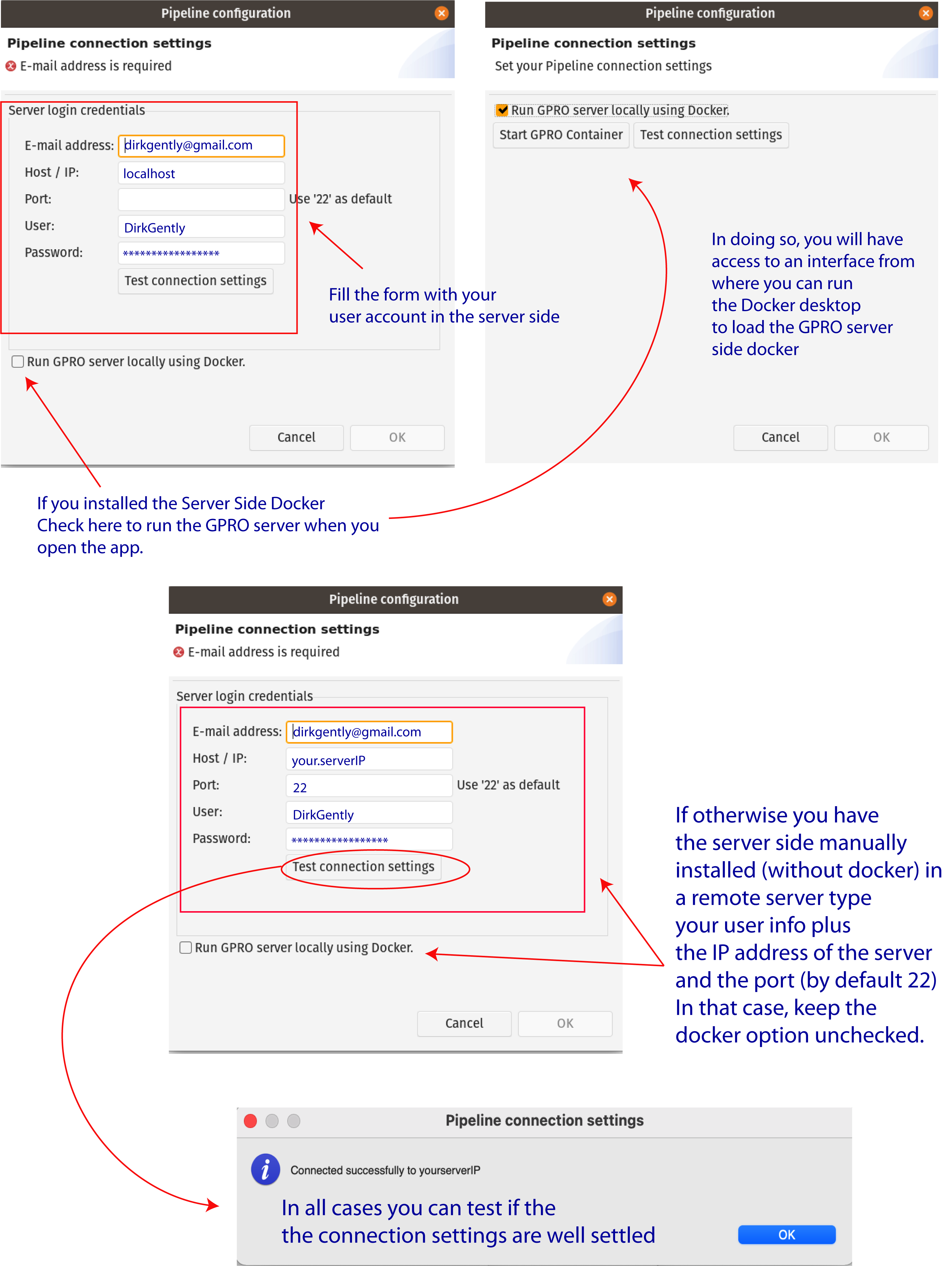
Figure 2: Server connection dialog.
1.3.4 - RAM ASSIGNATION TO YOUR PC
The RAM assigned to VariantSeq can be modified by editing two parameters, namely ‘Xms’ and ‘Xmx’ in the configuration file named “VariantSeq.ini”. In PC with operating systems Linux or Windows, the “VariantSeq.ini” configuration file will be located inside the VariantSeq app folder. In macOS computers, the file can be found by right-clicking on[VariantSeq.app → Show package contents → Contents → MacOS → VariantSeq.ini]
Within the "VariantSeq.ini" file, the Xms and Xmx parameters look like this:
Xms1024m (Minimum allocated memory)
|
1.4 - GETTING FAMILIAR
1.4.1 - VARIANTSEQ LAYOUT
The layout of VariantSeq is structured in the following sections: the "Directory Browser", the "FTP Browser", the "Workspace", the "Top menu", and the "Step-to-step Interface Menu" (Fig. 3)- DIRECTORY BROWSER: This provides access to any folder already contained in the user’s PC so that it can be uploaded into the VariantSeq application.
- FTP BROWSER: This provides access to the files contained in the server, allowing for files to be transferred from or from the server / directory browser. This is achieved by dragging the files from one side to the other.
- WORKING SPACE FOR PIPELINE INTERFACES: A central working space for viewing the different pipeline interfaces.
- TOP MENU: Main menu that allows for the selection of work mode, selection and execution of pipelines, and server connection preferences.
- STEP-BY-STEP INTERFACE MENU: The menu for managing the step-by-step protocols. For more details please refer to section 2 of this manual.
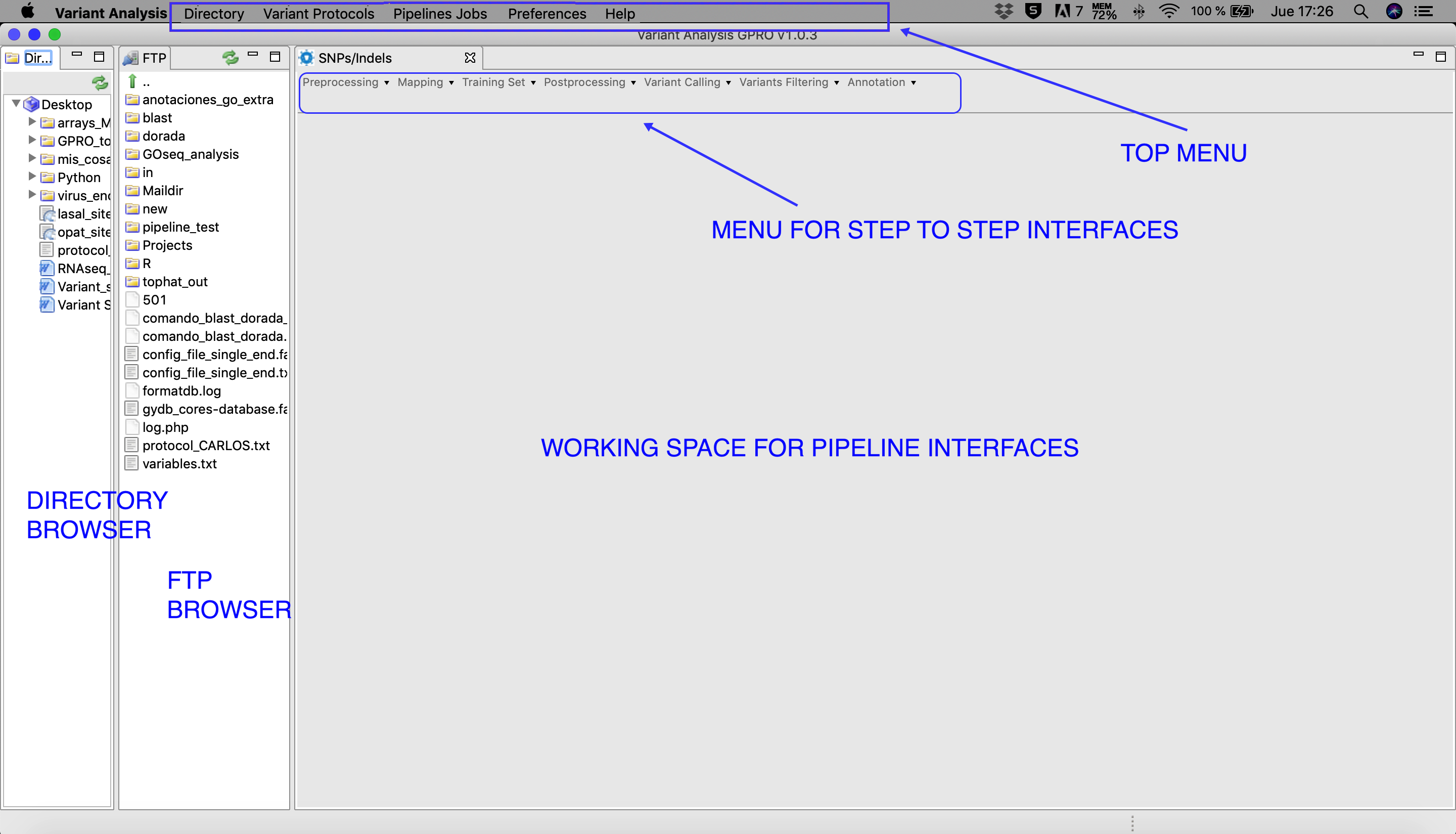
Figure 3: Main layout of VariantSeq. Both the Directory and FTP Browser windows can be resized or masked by clicking on the window icons in the top right corner of their respective windows. All files and folders contained in these browsers can be managed manually using the mouse. Please keep in mind that the window view shown in this manual will change depending on the operative system used.
1.4.2 - FUNCTIONS OF THE TOP MENU
The Top Menu presents the following tabs, each of which has a scroll down list with the following functions:- DIRECTORY:
[Directory → Select directory folder ] :select the Directory Browser.[Directory → Show ] :view the Directory Browser.[Directory → Hide ] :hide the Directory Browser.- VARIANT PROTOCOL:
[Variant protocols -> Pipeline Mode → Experiment Configuration ] :Configuration view to set up your VariantSeq experiment and launch a VariantSeq pipeline.[Variant Protocols -> Pipeline Jobs → Step-by-Step → SNP/Indels Protocol ] :Jobs view for SNP/Indels Protocol in manual mode.- PIPELINE JOBS:
[Pipeline Jobs → Jobs Tracking System ] :For jobs tracking.[Pipeline Jobs → FTP Transfers ] :screen for tracking the jobs of the sFTP protocol.- PREFERENCES:
[Preferences → Pipeline Connections Settings ] :setup your user credentials for accessing the server.- HELP:
[Help → Manual ] :Link to this manual.[Help → About VariantSeq ] :Other technical details and copyrigth of VariantSeq.
1.4.3 – SOME BASICS ON THE VARIANTSEQ INTERFACE
A typical interface of VariantSeq to call a CLI software dependency of the server side, is based on two sections. The first section presents distinct fields to declare the input and output material of an analysis while the second is section presents distinct fields for configuring the options and parameters of the called CLI tool.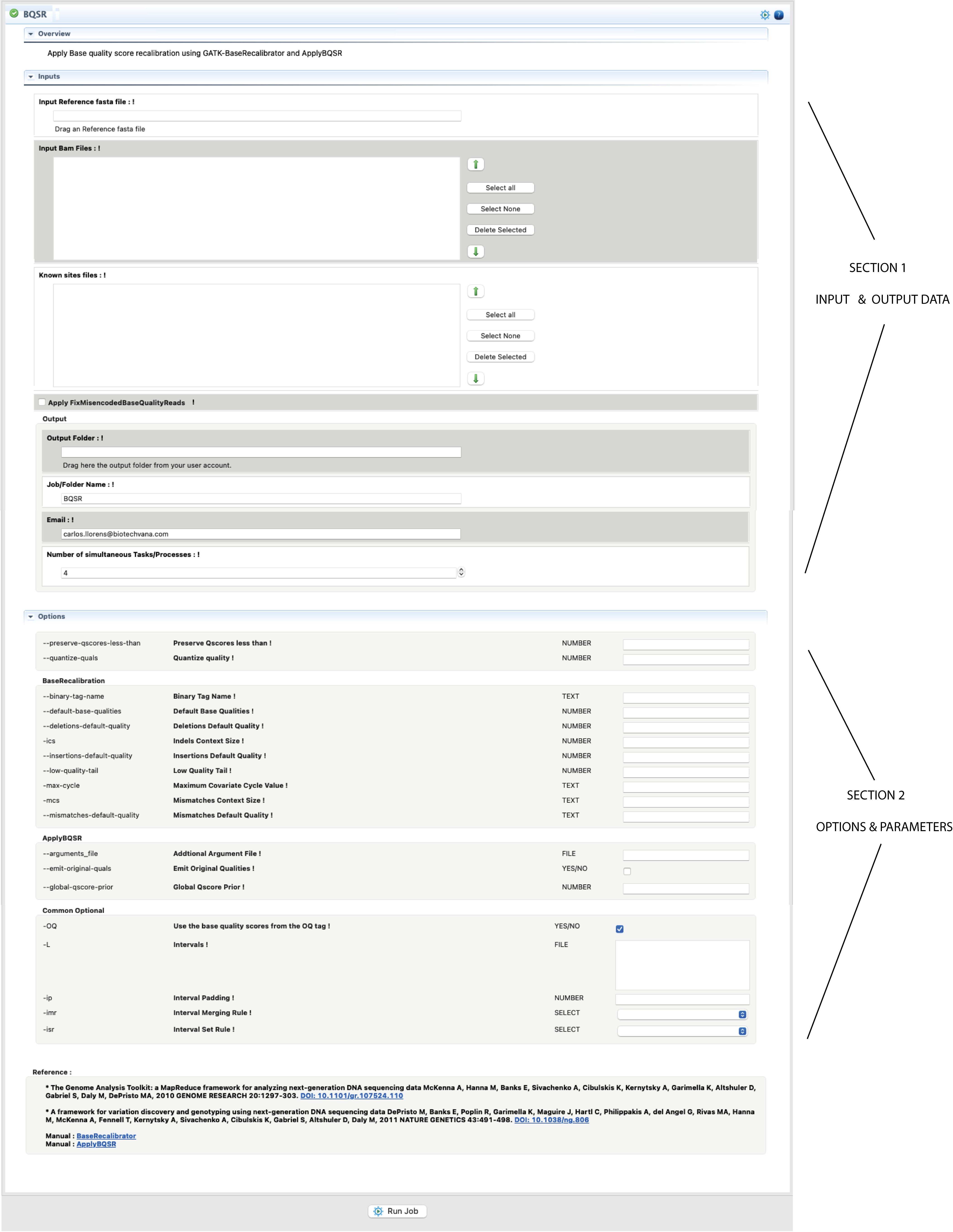
Figure 4: Example of interface for a CLI tool provided by the “VariantSeq” Step-By-Step mode. The figure shows the interface for the command BQSR of GATK.
The procedure is illustrated in Fig.4. Basically, you only need to select with the mouse the input file/s in FTP browser and drag it/them to their respective fields of the interface. The same can be done for the folder/s where you would like to have declared the output. Next, and if any, fill all other mandatory field(s) in the input/output section. If an input field is invalid or missing, you will get an error icon  beside the field (to see the error message you will need to hover the mouse over that icon). Next, configure the form for options and parameters available in the second section. If you set a parameter out of the possible range, you will receive a warning icon
  . If you need more information about any input or parameter, click on the exclamation mark ! in front of the input field name.
Filling the section of options and parameters is not mandatory. If you run the program without inputting any parameters and/or condition, VariantSeq will execute this program using the default conditions for this program.
Once the job input fields and the parameters have been fulfilled and/or configured, you only need to click to start button at the end the interface form to run the Job. If the job has been successfully launched, you will get a confirmation message. Otherwise revise again all input and outputs upload and the options if any.